
How to Create a Bar Chart Archive Widget In WordPress
Contents
Each time I redesign my blog, I try to implement some cool, visually interesting feature. This time around, I decided to build a widget to display post archives, styled to look like a vertical bar chart:
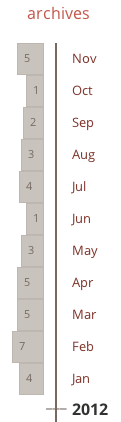
Making this widget turned out to be a bit tricky, but fun. In this post, I’ll describe how to do it.
1. Lay Out the Widget
We’ll start with the HTML. I chose to use two lists: one for the boxes and one for the labels. I should note that this is not the most semantically accurate way of doing it (because the two lists contain essentially the same information). That said, I found it easier to style than the alternative.
Here’s the HTML:
<aside class="archives">
<h3>archives</h3>
<ul class="archive-boxes">
<li class="archive-item-container"><a class="archive-box width-5" href="...">5</a></li>
....
<li class="archive-item-container archive-no-box"></li>
</ul>
<ul class="archive-labels">
<li class="archive-item-container"><a class="archive-month-label" href="...">Nov</a></li>
...
<li class="archive-item-container archive-year-label">2012</li>
</ul>
</aside>
Each month/year is represented by a list item, which contains a link to show the box (archive-box) or the label (archive-month-label).
2. Style the Widget
Now that we have our layout, let’s style the widget. It’ll be helpful to define some variables to use in our styles:
$increment: 0.2;
$box-height: 30px;
$base-color: #d5d0cc;
$archive-separator-color: darken($base-color, 40%);
$pad-unit: 1em;
There are also a couple of generic styles to create, one for the archive container and one for individual li elements:
.archives {
float: right;
max-width: 100px;
margin-top: $pad-unit * -0.5;
}

.archive-item-container {
margin-bottom: 0;
height: $box-height + 2;
}
A couple of things to note:
- Restricting the width of the
archivescontainer helps get everything to line up correctly. - Don’t forget to add enough pixels to the height of the
lito accommodate any borders you may have. In my case, I’ll have 1px borders both for top and bottom, so I added 2px to the height.
Styling the Boxes
To make this widget look like a bar chart, we need to vary the width of each box depending on how many posts there are. We can define the width using the following formula where x is the number of posts:
width(x) = base-value * (1 + increment * x)Using this formula, I created 12 classes: 11 to display months with 0 to 10 posts (width-*) and 1 to display months which exceed 10 posts (width--). I chose to cap it at 10 because I rarely exceed 10 posts in a given month. If you need more than that, feel free to define more classes.
.archive-boxes {
border-right: 2px solid $archive-separator-color;
padding-right: $pad-unit * 0.3;
float: left;

.width-0 { width: 0; }
.width-1 { width: $pad-unit; }
.width-2 { width: $pad-unit * (1 + $increment * 1); }
.width-3 { width: $pad-unit * (1 + $increment * 2); }
.width-4 { width: $pad-unit * (1 + $increment * 3); }
.width-5 { width: $pad-unit * (1 + $increment * 4); }
.width-6 { width: $pad-unit * (1 + $increment * 5); }
.width-7 { width: $pad-unit * (1 + $increment * 6); }
.width-8 { width: $pad-unit * (1 + $increment * 7); }
.width-9 { width: $pad-unit * (1 + $increment * 8); }
.width-10 { width: $pad-unit * (1 + $increment * 9); }
.width--- {
width: $pad-unit * (1 + $increment * 10);
border-left: 1px dashed darken($base-color, 10%) !important;
}
}
With widths taken care of, let’s focus on creating the key class of this widget, archive-box (as well as its boring sibling archive-no-box):
.archive-box {
background-color: darken($base-color, 5%);
border: 1px solid darken($base-color, 10%);
height: $box-height;
margin-right: $pad-unit/2;
float: right;
clear: both;
text-align: left;
font-size: $base-font-size * 0.7;
padding-left: $pad-unit/2;
color: darken($base-color, 40%);

&:hover {
text-decoration: none;
background-color: darken($base-color, 15%);
border: 1px solid darken($base-color, 20%);
}
}

.archive-no-box {
float: right;
clear: both;
}
To make it look like a box, we need to set the height, border and background-color, as well as add some padding / margin. To ensure that the boxes sit flush against the right border, we need to float them right.
Styling the Labels
Styling the list of labels is significantly more straight forward:
.archive-labels {
float: right;
a {
font-size: $base-font-size * 0.8;
color: darken($primary-color, 20%);
}
}

.archive-month-label {
margin-bottom: 0;
}

.archive-year-label {
font-weight: 600;

&:before {
content: "___";
margin-left: $pad-unit * -1.6;
margin-top: $pad-unit * -0.5;
float: left;
color: $archive-separator-color;
}
}
Probably the only notable thing here is that I’m using a :before selector to draw a tick mark in front of the year label.
3. Get The Archives
The last piece of the puzzle is a bit of php code to make the widget work. I should point out that WordPress already has a built-in way to get the archives via [wp_get_archives()](http://codex.wordpress.org/Function_Reference/wp_get_archives). Unfortunately, this function isn’t flexible enough for our purposes, so we’ll need to get the data directly from the database:
<php
get_header();

global $wpdb;

$query = "SELECT YEAR(post_date) AS 'year', MONTH(post_date) AS 'month', COUNT(ID) as post_count"
."FROM $wpdb->posts :
."WHERE post_type = 'post' AND post_status = 'publish' "
."GROUP BY month, year "
."ORDER BY post_date DESC"

$months = $wpdb->get_results($query);
This query returns a $months collection which contains a count of posts by month/year. Using this collection, we can build up the HTML we need:
$link = "";
$month_abbr = "";
$archive_boxes = "";
$archive_labels = "";

foreach($months as $month) {
$link = get_month_link( $month->year, $month->month );
$month_abbr = date('M', mktime(0,0,0,$month->month, 1, $month->year));
$count_class_suffix = ($month->post_count > 10 ? '--' : $month->post_count);

$archive_boxes .= "<li class=\"archive-item-container\"><a class=\"archive-box width-$count_class_suffix\" href=\"$link\">$month->post_count</a></li>";
$archive_labels .= "<li class=\"archive-item-container\"><a class=\"archive-month-label\" href=\"$link\">$month_abbr</a></li>";

// add row for year
if ($month->month == 1) {
$archive_boxes .='<li class="archive-item-container archive-no-box"></li>';
$archive_labels .= "<li class=\"archive-item-container archive-year-label\">$month->year</li>";
}
}
Finally, we can finally insert the archive widget in our page:
<aside class="archives">
<h3>archives</h3>
<ul class="archive-boxes no-bullets">
<?php print $archive_boxes ?>
</ul>
<ul class="archive-labels no-bullets">
<?php print $archive_labels ?>
</ul>
</aside>